
How to Use Ardhisasa: Search Land Records Step by Step
Search any land parcel in Kenya via Ardhisasa (eCitizen portal). We show you how to create an account, run a search, read results, and spot red flags.
Complete Ardhisasa Tutorial: Land Search Made Easy
If you’re buying property in Kenya, learning how to use Ardhisasa is one of the most valuable skills you can develop. This Ardhisasa tutorial walks you through the entire land search process, step by step, from creating your account to interpreting your results and spotting potential red flags.
The platform can feel confusing at first. The interface isn’t always intuitive, error messages can be cryptic, and it’s not always clear what your results actually mean. This guide addresses all of that. By the end, you’ll be able to verify any property in a covered county yourself, from your phone or laptop, in under 30 minutes.
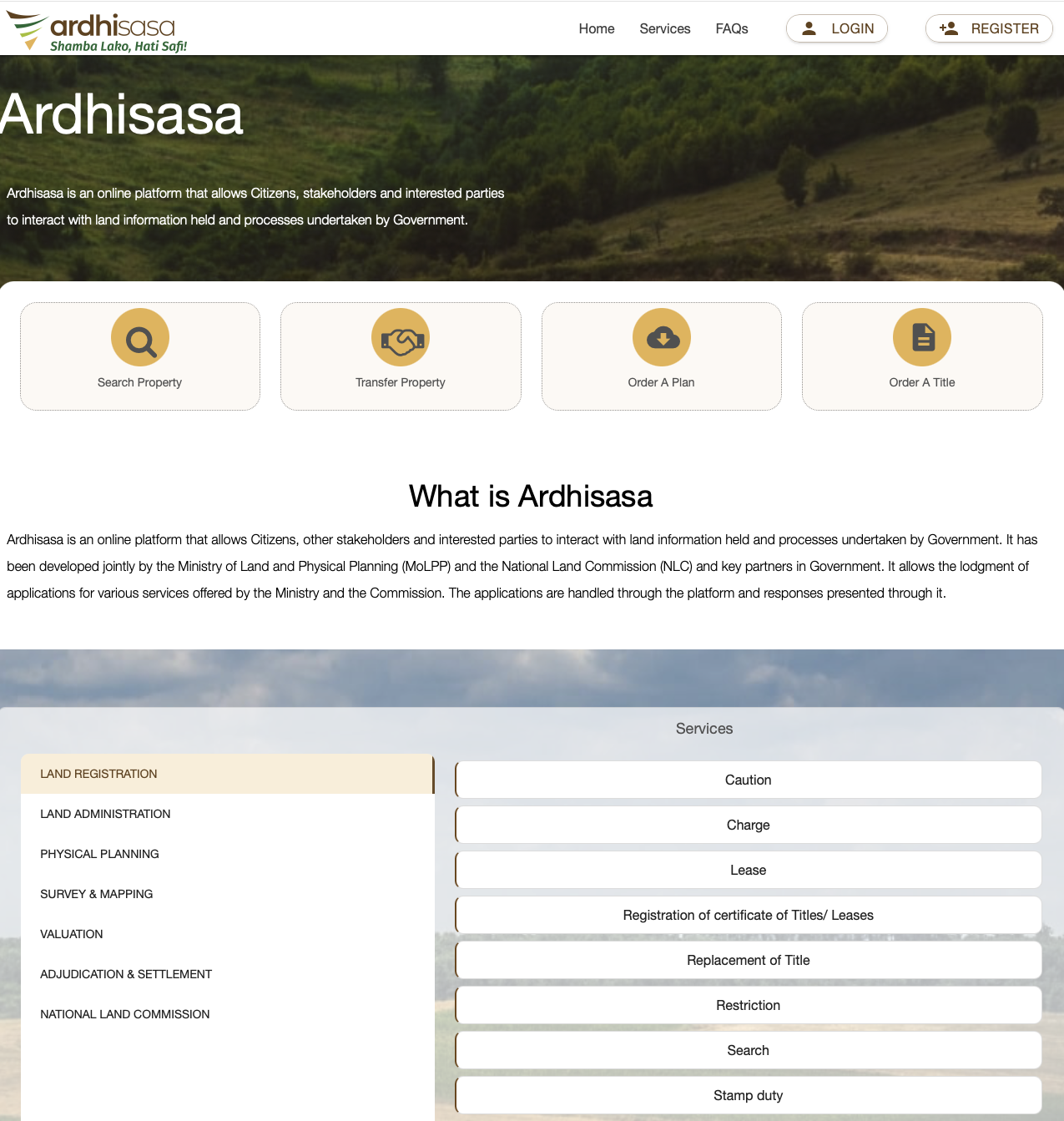
What Is Ardhisasa and Why It Matters
Ardhisasa (Swahili for ‘land now’) is Kenya’s official digital land registry — the National Land Information Management System (NLIMS). Launched in April 2021 for Nairobi, it’s the government’s platform for conducting land searches, registering transactions, and verifying title deed details online.
As of early 2026, the government has announced plans to roll Ardhisasa out to all 47 counties, though it’s currently fully operational in Nairobi and Murang’a. Kiambu, Isiolo, Mombasa, and Machakos are in active rollout. Since March 2025, all mutation forms (for subdivisions and amalgamations) must be processed through Ardhisasa nationwide, even in counties where land records haven’t been fully digitised.
For property buyers, Ardhisasa is a critical first step in due diligence. It allows you to confirm who owns a property, what the land reference number is, and whether there are any encumbrances registered against it — all before committing any money.
For more on why verification matters, read our guide: How to Verify a Title Deed in Kenya. → Link to: /blog/verify-title-deed-kenya
 |
What You Need Before You Start
Documents and Information
• A Kenyan national ID number — required for account registration. The system verifies your identity against the IPRS (Integrated Population Registration System).
• A Safaricom, Airtel, or Telkom phone number — you’ll receive OTP (one-time password) verification codes via SMS.
• The land reference number (LR number) or title number of the property you want to search. Ask the seller for this before starting.
• KES 500–1,000 for the search fee, payable via M-Pesa, debit card, or credit card through the ArdhiPay system.
For Foreigners and Diaspora Buyers
If you don’t have a Kenyan national ID, you’ll face a barrier at registration. Your details aren’t in the IPRS system, so automated sign-up won’t work. You’ll need to write to the Ministry of Lands requesting manual account setup, or have a Kenyan-based lawyer conduct the search on your behalf.
Pro tip: If you’re in the diaspora, a verified agent on Afriqahome or a conveyancing lawyer can conduct the Ardhisasa search for you and share the results. This is often faster than navigating the foreign registration process. |
Account Registration
Creating an Ardhisasa account is free. Here’s how:
Step 1: Go to ardhisasa.lands.go.ke
Open the platform in any browser on your phone or laptop. There is no mobile app yet — despite some guides referencing one, the Ministry confirms the app is still under development.
Step 2: Click ‘Create Account’ and enter your details
You’ll need your national ID number, full name, email address, and phone number. The system pulls your details from IPRS to verify your identity. One phone number can only be linked to one account.
Step 3: Complete OTP verification
You’ll receive a one-time password via SMS. Enter it within 2 minutes — it expires quickly.
Common issue: Many users report the ‘OTP Generation Failed’ error, especially on Safaricom lines. This usually happens because your phone blocks promotional SMS. Fix: go to your phone’s message settings and unblock promotional messages. Also, avoid requesting multiple OTPs in rapid succession — wait at least 2 minutes between attempts. |
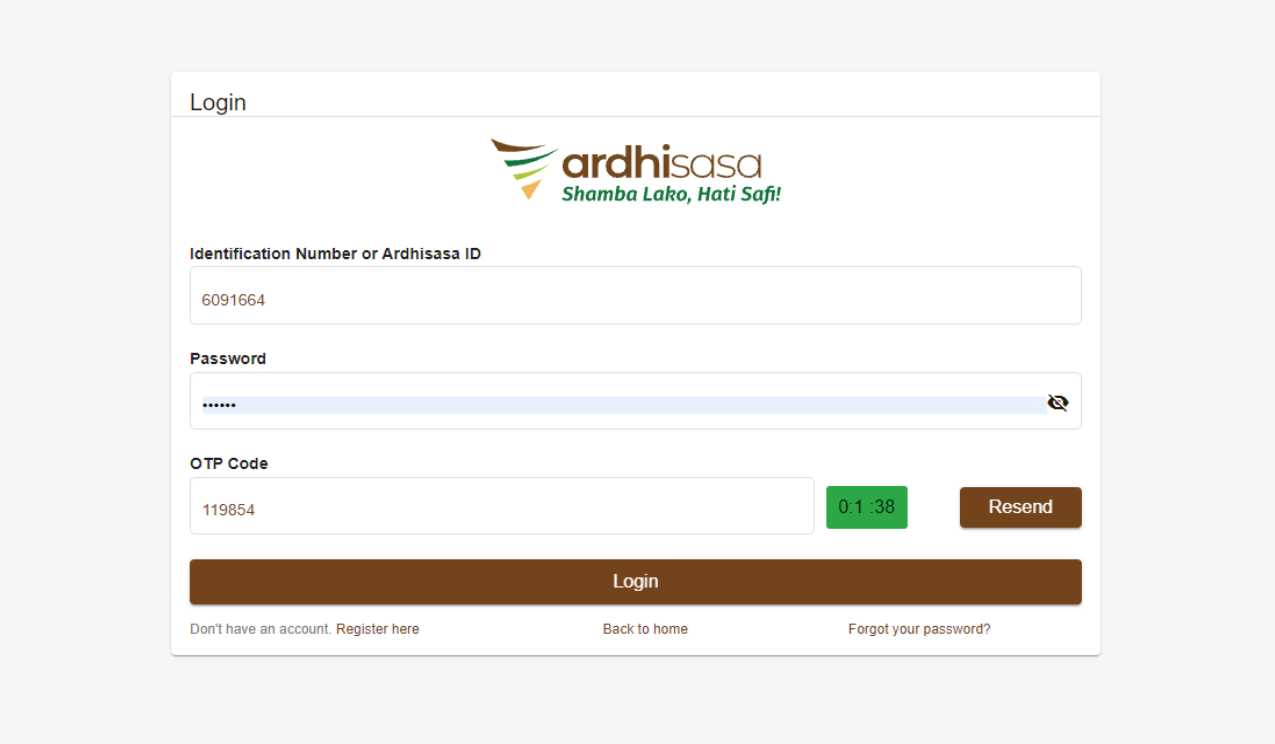 |
Step 4: Set your password and log in
Choose a strong password. You’ll use your phone number and this password for all future logins. A new OTP is generated for each login session.
How to Conduct a Land Search on Ardhisasa
This is the core of the Ardhisasa tutorial. Follow these steps in sequence.
Step 1: Log in to your account
Go to ardhisasa.lands.go.ke and enter your phone number and password. You’ll receive an OTP via SMS — enter it to complete your login. If you don’t receive the OTP, check your promotional messages folder or wait 2 minutes before requesting a new one.
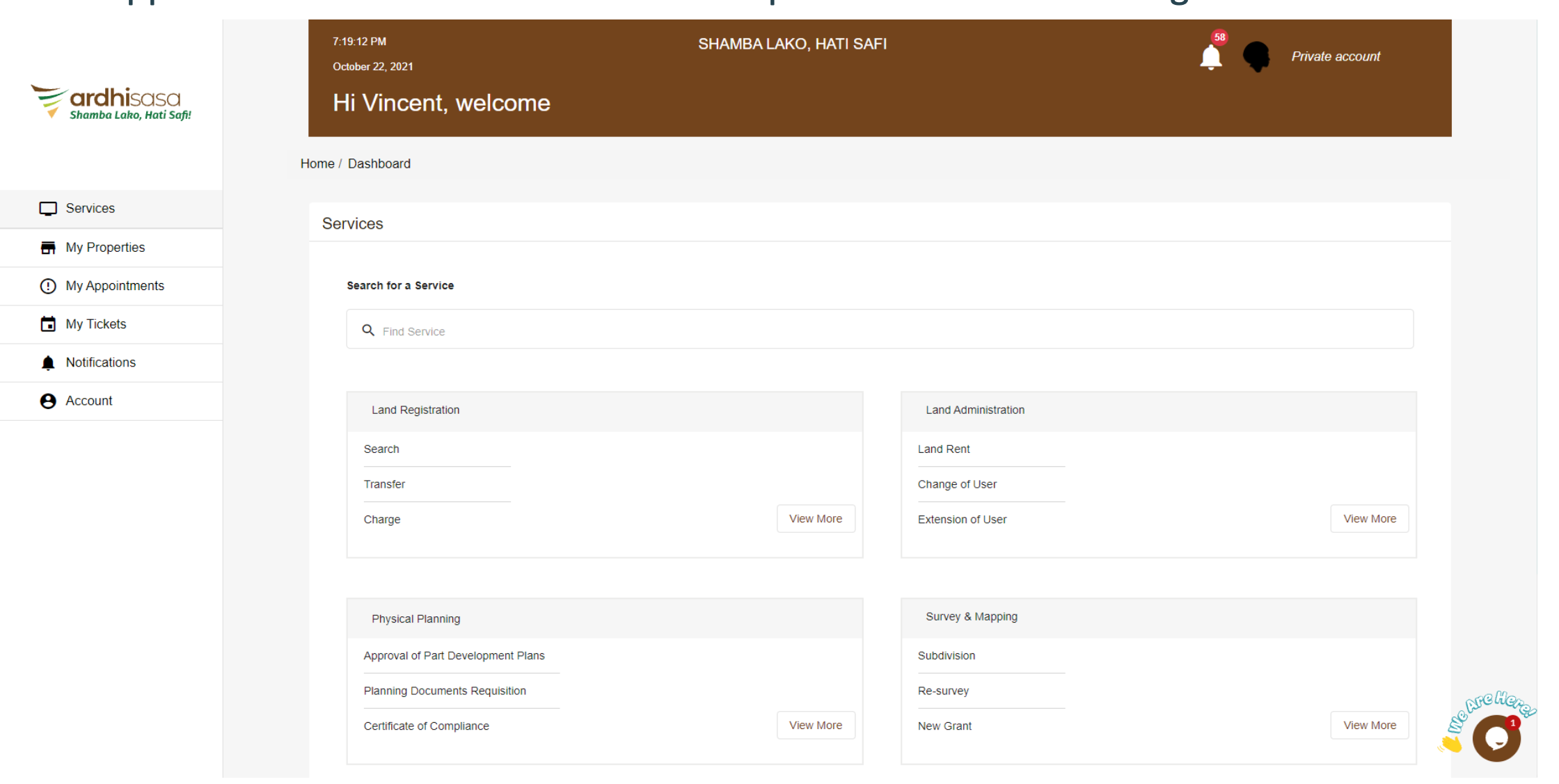 |
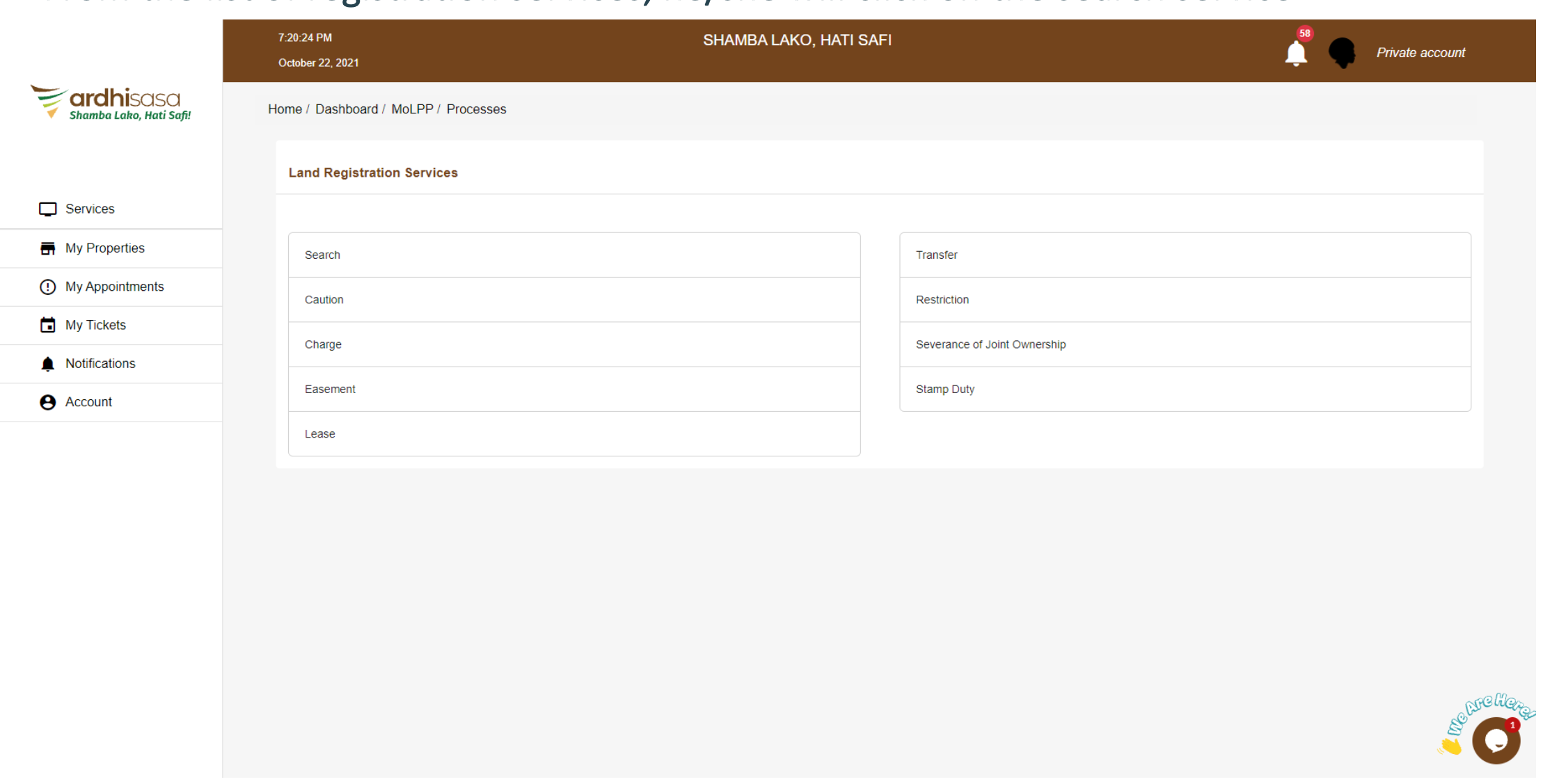
Step 2: Navigate to ‘Land Search’
From the main dashboard, find and select the ‘Land Search’ or ‘Title Search’ option. This may appear in the navigation menu or as a prominent button on the dashboard.
 |
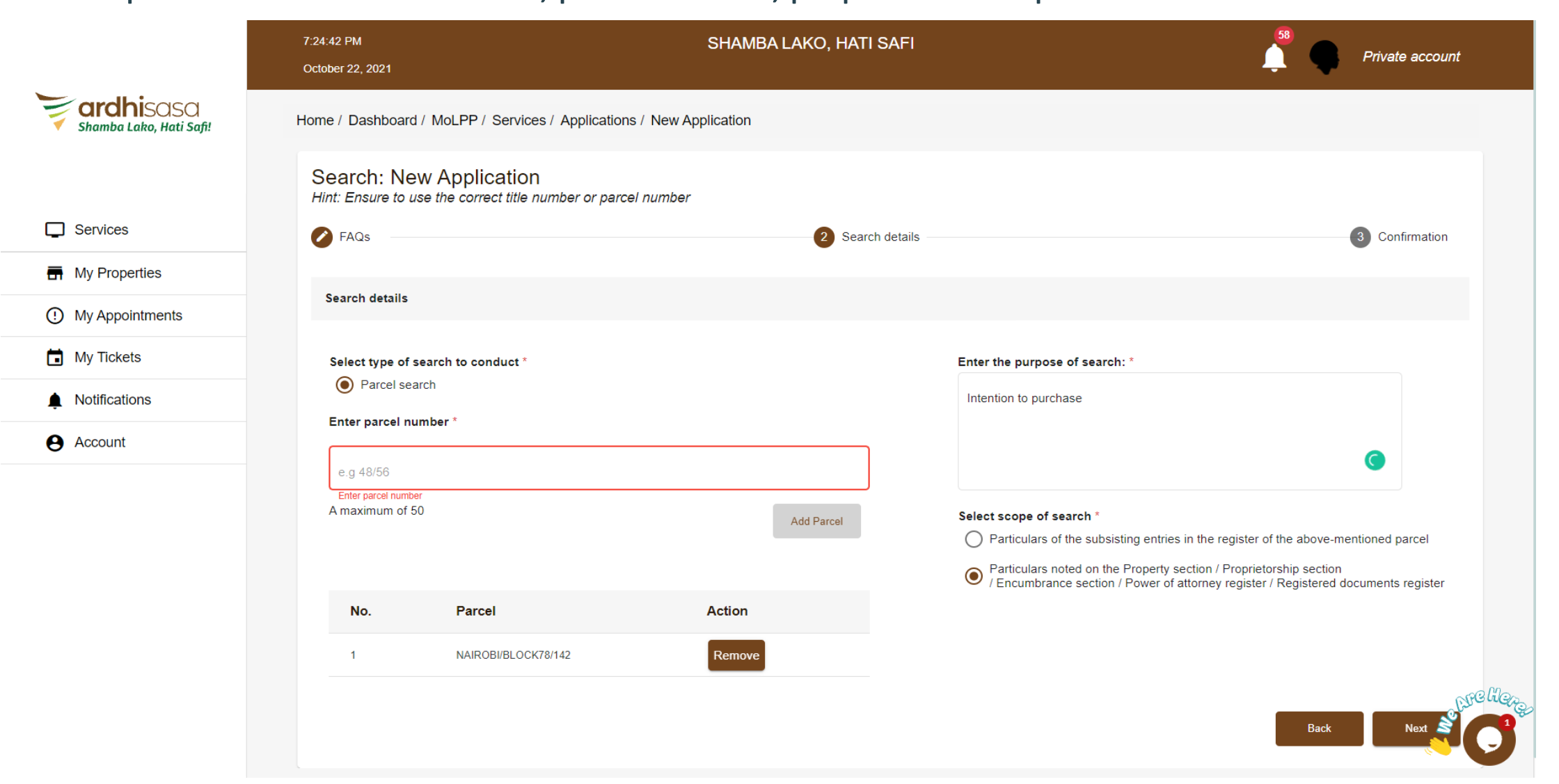
Step 3: Enter the property details
You’ll be asked to enter the property’s identifying information. Depending on the property type, this could be:
• Title Number — for freehold properties
• Land Reference Number (LR) — for Nairobi properties under the old registration system
• Plot Number + Registration Section — for some county-registered land
Enter the information exactly as it appears on the title deed the seller gave you. Spacing and formatting matter — if the title says ‘LR. No. 209/12345’, enter it in that exact format.
 |
Step 4: Pay the search fee
The standard search fee is KES 500–1,000, payable through ArdhiPay. You can pay via M-Pesa (you’ll receive an STK push to your phone), credit card, or debit card. Keep the M-Pesa confirmation message or transaction receipt — you may need it if a payment dispute arises.
Fee note (February 2026): The official gazetted search fee is KES 1,000 per Legal Notice No. 36 (2023), but the platform has been charging KES 500 for most standard searches. Some sources cite KES 2,000. Budget KES 1,000 to be safe. |
Step 5: Submit and wait for owner consent
This is the step that catches most people off guard. Unlike the old system where anyone could pay and receive search results, Ardhisasa requires the registered property owner to approve your search request before results are released. The owner receives a notification and must consent to the search.
In a typical buying scenario, this isn’t a problem — a willing seller will approve the search. But it can cause delays if the owner is slow to respond, travelling, or if the property is in dispute.
Red flag: If a seller refuses to consent to an Ardhisasa search, or repeatedly delays approval, treat this as a serious warning sign. Legitimate sellers have nothing to hide. Read more: How to Avoid Property Scams in Kenya. → Link to: /blog/property-scams-kenya |
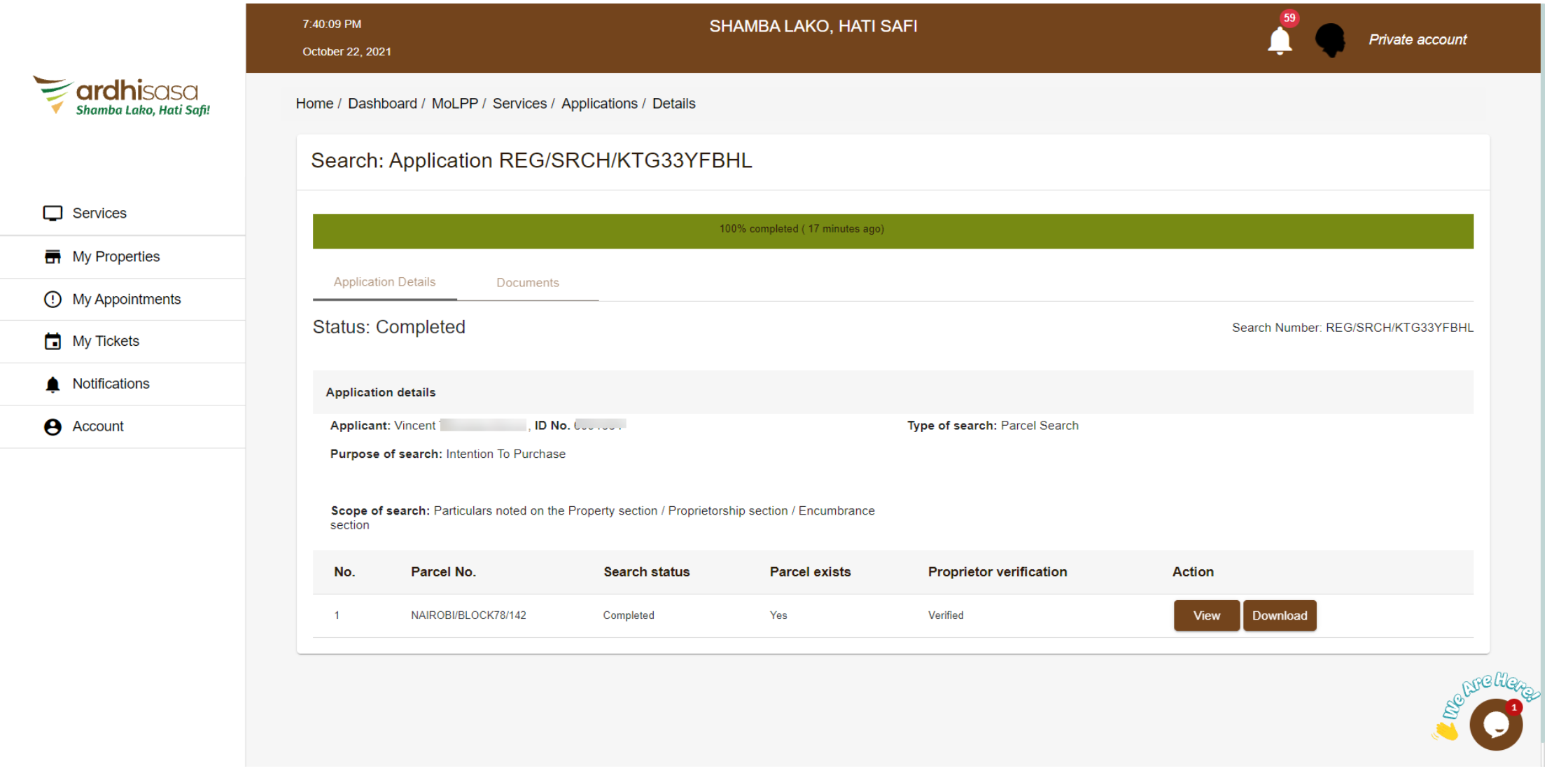
Step 6: Receive and download your results
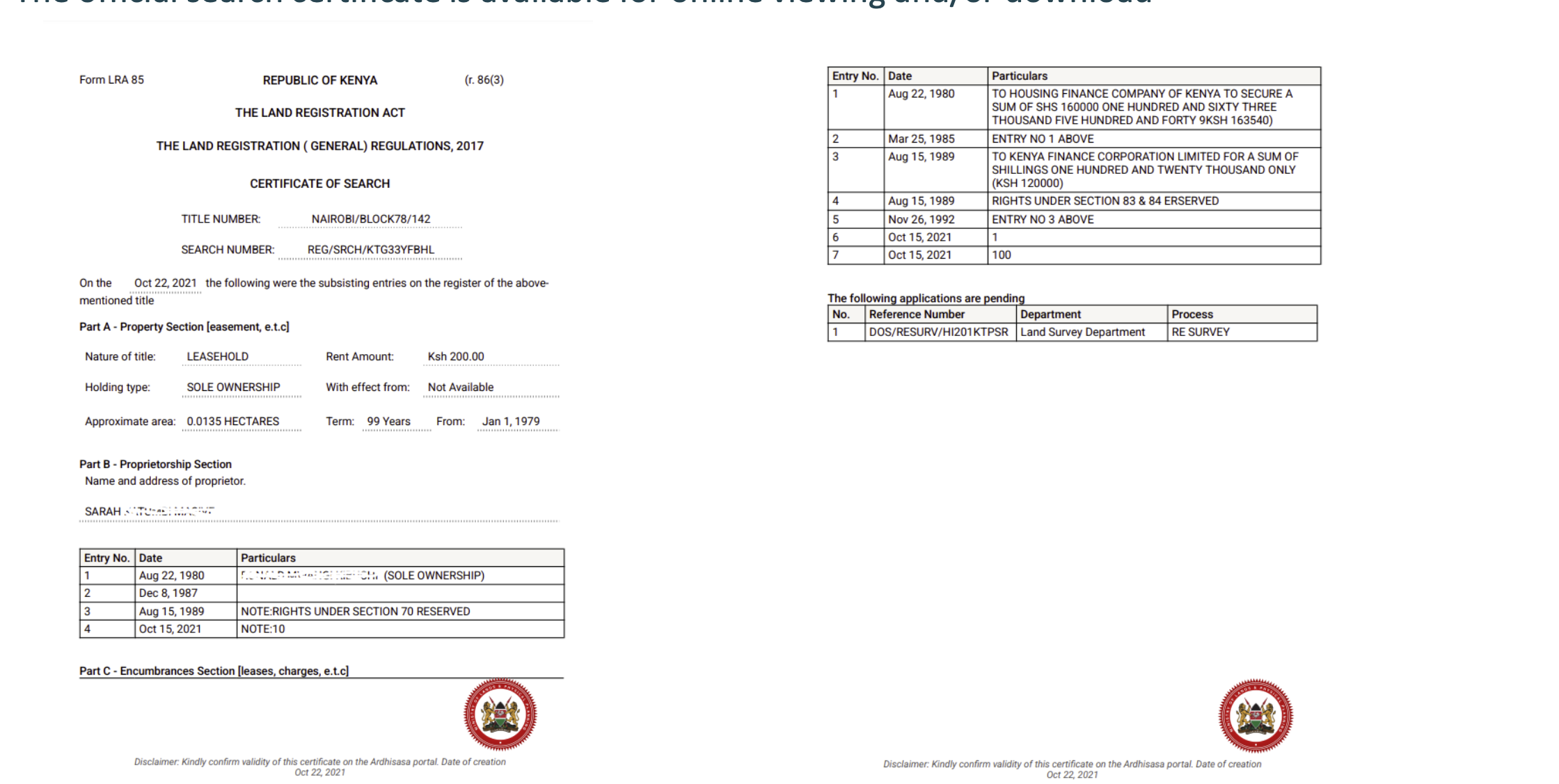
Once the owner consents, your search results will appear in your Ardhisasa dashboard. You can view them online and download a PDF copy. The results include the registered owner’s name, land reference number, plot size, any registered encumbrances (charges, caveats, loans), and the registration date.
 |
How to Read Your Ardhisasa Search Results
Your search results contain several fields. Here’s what each one means and why it matters:
Field | What It Shows | What to Check |
Registered Owner | The person or entity legally recorded as the property’s owner | Does this name match the seller’s national ID exactly? If not, ask why. |
Title / LR Number | The unique identifier for this property in the registry | Does it match the title deed document the seller gave you? |
Land Reference (Parcel) | The geographic identifier for the physical plot | Cross-reference with the Survey of Kenya RIM (Registry Index Map). |
Size / Area | The registered area of the property in hectares or square feet | Compare against the title deed and any survey plan. |
Nature of Title | Freehold, leasehold (and remaining term), or absolute | For leasehold, check years remaining. Fewer than 30 years may affect bank financing. |
Encumbrances | Any charges, caveats, mortgages, or restrictions registered against the property | Any entry here requires investigation. A charge means a loan is secured against the property. |
Registration Date | When the current ownership was registered | Very recent dates (within the past few months) may warrant checking the transfer history. |
→ For a deeper guide on verifying title deeds, see: How to Spot Fake Title Deeds: 15 Warning Signs. → Link to: /blog/fake-title-deeds-kenya-warning-signs
 |
Red Flags in Your Search Results
Your Ardhisasa results are a starting point, not a final answer. Watch for these warning signs:
• The registered owner’s name doesn’t match the seller. This is the most common red flag. The person selling you the property must either be the registered owner or have legal authority (Power of Attorney, letters of administration) to sell on someone else’s behalf.
• Encumbrances listed that the seller didn’t mention. A registered charge means a bank has a lien on the property. A caveat means someone has a legal claim. Either should be resolved before you proceed.
• The plot size doesn’t match what you were told. If the seller says the plot is a quarter acre (10,890 sq ft) but the search shows 5,000 sq ft (a 50x100), something is wrong.
• Very recent registration date. A property that changed hands just weeks before being offered to you may indicate a chain of fraudulent transactions. Check the transfer history.
• The property doesn’t appear in Ardhisasa at all. This could mean the property is in a county not yet digitised, OR it could mean the title deed is forged. Don’t assume one or the other — investigate further at the physical county land registry.
• Sectional title not found. Apartments, flats, and townhouses under sectional title are not yet in the Ardhisasa system because they lack the required geospatial data. A ‘no results’ response for a sectional property doesn’t necessarily mean fraud, but it does mean you need to verify through other channels.
→ Link to: /blog/property-due-diligence-checklist-kenya
When Ardhisasa Is Not Enough
Ardhisasa is a powerful tool, but it has limitations that every buyer needs to understand. It’s a critical first step in your due diligence, not a substitute for the full process.
Coverage gaps
Only Nairobi and Murang’a are fully operational. Kiambu, Mombasa, and Isiolo are being onboarded but may have incomplete records. For properties in other counties, you’ll need the eCitizen portal or an in-person search at the county land registry.
Not all Nairobi records are uploaded
Even within Nairobi, some title blocks haven’t been digitised. Properties with incomplete documentation, double allocations, or those flagged in the Ndung’u Report on irregular land allocations may be absent from the system.
Sectional properties are excluded
Apartments, flats, and townhouses registered under sectional title are not searchable on Ardhisasa. If you’re buying a flat in Kilimani or a townhouse in Syokimau, you’ll need to verify through a physical search at the land registry or through your lawyer.
Owner consent can block legitimate searches
The requirement for owner approval means you can’t independently verify a property if the seller is uncooperative. In cases where a seller refuses consent, have your lawyer conduct an in-person search at the county registry, which doesn’t require owner approval.
What else to do beyond Ardhisasa
• Hire a licensed surveyor to verify physical boundaries against the survey plan.
• Engage a conveyancing lawyer to conduct a comprehensive search including encumbrance certificates.
• Visit the physical property and talk to neighbours and the local area chief.
• Verify the agent’s credentials if one is involved. → Link to: /blog/verify-real-estate-agent-kenya
Ardhisasa vs eCitizen Land Search
This is one of the most common questions, and the answer depends on where the property is located.
Feature | Ardhisasa | eCitizen Land Search | |
URL | |||
Coverage | Nairobi, Murang’a (fully); Kiambu, Mombasa, Isiolo (partial) | All 47 counties (for non-digitised records) | |
Search fee | KES 500–1,000 | KES 500–550 | |
Results speed | Minutes to hours (after owner consent) | Approximately 24 hours | |
Owner consent required? | Yes | No | |
Payment method | ArdhiPay (M-Pesa, card) | M-Pesa, card via eCitizen | |
Mobile app? | No (browser only) | No | |
Transaction capabilities | Full: searches, transfers, registrations | Search only | |
Best for | Properties in Nairobi / Murang’a | Properties outside Ardhisasa coverage | |
Which should you use? If the property is in Nairobi or Murang’a, start with Ardhisasa — it’s mandatory for those counties. For everywhere else, use eCitizen. For maximum protection, do both: an Ardhisasa search AND have your lawyer conduct an in-person search at the county registry.
Frequently Asked Questions
How much does an Ardhisasa land search cost?
The standard fee is KES 500–1,000 per search. The gazetted rate is KES 1,000 (Legal Notice No. 36, 2023), but the platform has been charging KES 500 for many standard searches. Payment is through ArdhiPay via M-Pesa, debit card, or credit card. Budget KES 1,000 per search to be safe.
Why am I getting ‘OTP Generation Failed’?
This is the most common Ardhisasa complaint. Your phone is likely blocking the SMS. On Safaricom, go to Settings and unblock promotional messages. Wait at least 2 minutes between OTP requests. The OTP expires after just 2 minutes, so enter it quickly once received. If the problem persists, try from a different browser or clear your cache.
Can I search any property in Kenya on Ardhisasa?
No. Ardhisasa is currently fully operational only in Nairobi and Murang’a counties. Properties in Kiambu, Mombasa, Isiolo, and Machakos may be partially searchable. For all other counties, use the eCitizen land search portal or visit the county land registry in person.
Is there an Ardhisasa mobile app?
No. Despite some websites referencing an app, the Ministry confirms the Ardhisasa mobile app is still under development as of early 2026. You can access the platform through any mobile or desktop browser at ardhisasa.lands.go.ke.
Why does the owner need to approve my search?
Ardhisasa requires the registered owner to consent before search results are released to a third party. This is a privacy and security measure, but it creates friction in practice. If a seller is willing to sell, they should have no reason to refuse a search. Refusal is a significant red flag.
My property doesn’t appear in Ardhisasa. Does that mean the title is fake?
Not necessarily. The property may be in a county not yet on Ardhisasa, it could be a sectional title (apartments/flats, which aren’t in the system), or the specific title block may not have been digitised yet. However, a missing record also could indicate a forged document. Don’t draw conclusions either way — verify at the physical county land registry.
Can I use Ardhisasa from outside Kenya?
Yes, the platform is accessible from anywhere with an internet connection. However, you need a Kenyan phone number for OTP verification. Diaspora buyers often ask a trusted person in Kenya to register an account, or have their lawyer conduct the search. On Afriqahome, verified agents can also help with this process.
How long do results take?
If the owner approves promptly, you can receive results within minutes to a few hours. However, if the owner is slow to respond, it can take days. The government originally promised 3–5 minute results, but real-world experience varies. For time-sensitive transactions, have your lawyer conduct a parallel in-person search.
Download the Ardhisasa Quick Reference Card
We’ve distilled this entire tutorial into a one-page Ardhisasa Quick Reference Card you can save on your phone or print. It includes the step-by-step process, what each result field means, the red flags to watch for, and current fee information.
→ Download: /resources/ardhisasa-quick-reference-card.pdf
Still Unsure? Let a Verified Agent Help
Ardhisasa is a tool that puts verification power in your hands. But interpreting results, navigating edge cases, and conducting the full due diligence process can still feel overwhelming — especially if you’re buying from abroad or dealing with a complex property history.
On Afriqahome, you can connect with agents who have been through our verification process. They can help you conduct and interpret Ardhisasa searches, guide your due diligence, and give you the confidence to move forward — or the clarity to walk away.
Other Guides
Living in Juja, Kiambu: The University Town That Became a Satellite City — Prices, Estates & Honest Guide (2026)
Juja houses from KSh 1.2M, rent from KSh 2.5K. JKUAT area, Kenyatta Road estates, Kalimoni, Witeithie. Student yields 9-15%.
Westlands Property Guide: Prices, Lifestyle & Investment (2026)
Complete guide to Westlands real estate. Apartments from KES 8M, rental yields 6-8%, plus lifestyle amenities. Browse verified Westlands listings today.

Houses for Sale in Karen: Price Guide 2026
Karen house prices from KES 35M–250M+. 4-bedroom, 5-bedroom, villas. Karen Hardy, Ndege Road, budget breakdown. Updated March 2026.